Vintage Metal Gate Design Mega Pack: A Guide to Timeless Elegance
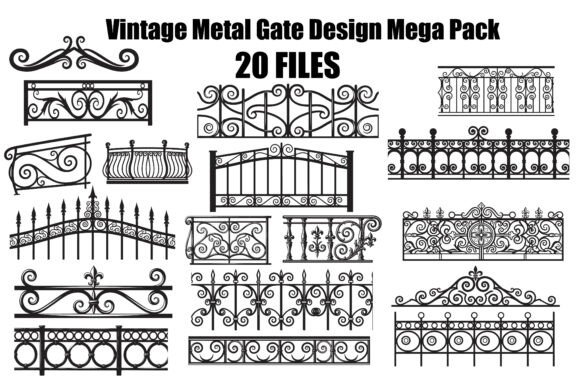
Bringing the intricate beauty of classic wrought iron into modern digital projects requires more than just a quick download. The Vintage Metal Gate Design Mega Pack offers a curated selection of 20 beautifully detailed designs, ranging from ornate scrollwork to sturdy balcony railings. For creators looking to add a touch of historical charm to their work, this collection serves as a robust foundation. However, simply owning the files is not enough to guarantee professional results. Understanding how to properly evaluate, prepare, and apply these vector assets is the difference between a polished final product and a frustratingly flawed one.
Understanding the Value of Scalable Vector Assets
The primary appeal of the Vintage Metal Gate Design Mega Pack lies in its format. Unlike raster images that pixelate when enlarged, this pack provides SVG, EPS, PNG, and JPG files. This versatility is crucial for professionals and hobbyists alike. Whether you are cutting vinyl for a wall decal or routing metal for an actual architectural feature, scalability ensures that the delicate curves of the scrollwork remain crisp at any size.
Many beginners overlook the significance of file formats until they are mid-project. Choosing a low-resolution PNG for a large-scale CNC project, for instance, can lead to jagged edges and lost detail. By understanding that the SVG and EPS files are the "master" versions intended for editing and scaling, you avoid unnecessary limitations. These editable vectors allow you to adjust line weights, separate elements for multi-layer cuts, or modify patterns to fit specific dimensions without compromising quality.
Common Pitfalls When Selecting Ornamental Designs
A frequent mistake when browsing design packs like this one is focusing solely on the visual aesthetic while ignoring technical complexity. A design might look stunning in a thumbnail, but if it contains thousands of overlapping nodes or extremely thin lines, it can cause significant issues during production.
- Over-complicated Paths: Some vintage styles rely on incredibly dense detailing. If you are using a laser cutter or a Cricut machine with limited precision, these fine details may not cut cleanly or could burn through the material unexpectedly.
- Unconnected Nodes: In some vector collections, decorative elements are not fully closed paths. This can result in "ghost" cuts where your machine cuts air instead of material, wasting time and resources.
- Scale Misjudgment: Assuming a design will look good at any size is a common error. A grand gate design scaled down to a small scrapbook embellishment might lose its character entirely, appearing as a solid blob rather than an intricate pattern.
To avoid these issues, always inspect the vector structure before committing to a project. Open the file in your preferred software—such as Adobe Illustrator, CorelDRAW, or Silhouette Studio—and zoom in to check node density. Ensure that all lines are connected where necessary and that the thickness of the strokes is appropriate for your intended medium.
Matching the Right Format to Your Project Goals
The Vintage Metal Gate Design Mega Pack includes multiple file types, each serving a distinct purpose. Using the wrong format for a specific task is a subtle but costly error that affects efficiency and presentation.
When to Use SVG and EPS
These are your go-to formats for any project requiring resizing or modification. If you are creating custom stencils, designing a logo for a fencing company, or preparing a file for a CNC router, always start with the SVG or EPS version. These formats retain the mathematical data of the shapes, allowing for infinite scaling. Attempting to resize a JPG or PNG for these applications will inevitably lead to blurriness and poor definition.
The Role of High-Resolution PNGs
While PNGs are excellent for presentations, web mockups, or print-on-demand items where editing isn't required, they have a fixed resolution. Do not use a PNG if you plan to enlarge the design significantly. For example, if you need a 4-foot wide gate graphic for a trade show banner, a PNG might appear pixelated on high-definition screens. Always verify the pixel dimensions of the PNG against your final output requirements.
Practical Application: From Digital File to Physical Reality
Translating a digital vintage gate design into a physical object involves several steps where errors often creep in. One of the most overlooked aspects is material compatibility. Just because a design looks like wrought iron doesn't mean it translates perfectly to every material.
If you are using these designs for metal art fabrication, consider the kerf width of your plasma cutter or laser. Intricate scrollwork might require slight adjustments to the line thickness to account for the material removed by the cutting tool. Similarly, for paper crafts or scrapbooking, ensure that the inner details of the gate design are large enough to be handled without tearing. Delicate filigree that works well in steel might be too fragile for cardstock.
Another critical consideration is the background. While the pack includes transparent PNGs, always double-check the layering in your vector software. Sometimes, hidden white rectangles or stray anchor points can interfere with your cutting mat alignment or print layout. Taking a moment to clean up the file—removing unused layers and ensuring transparency—is a small step that yields professional results.
Evaluating Quality Before You Buy or Download
Before integrating the Vintage Metal Gate Design Mega Pack into your workflow, take the time to evaluate what is actually included. Look beyond the marketing description. Check the variety of patterns to ensure there is a mix of simple borders and complex centerpieces. A balanced collection allows you to create cohesive designs without repeating the same motif too frequently.
Also, consider the licensing terms. While this pack is suitable for both commercial and personal use, always confirm if there are restrictions on selling the raw files themselves versus selling products made from them. Reselling the vector files as your own is typically prohibited, whereas creating a physical product, such as a decorative metal sign or a printed poster, is usually permitted. Clearing this up beforehand protects your business from potential legal complications.
Maximizing Efficiency in Your Creative Workflow
Efficiency comes from preparation. Once you have downloaded the Vintage Metal Gate Design Mega Pack, organize your files immediately. Create folders for different formats (SVG, EPS, PNG) so you don't waste time searching later. If you plan to use these designs across multiple projects, consider creating a library of pre-sized variations. For instance, save a standard 8x10 inch version of your favorite gate design for quick access when working on photo frames or wall décor.
Furthermore, experiment with combining elements. The true power of vector art is modularity. You might take the top arch from one gate design and pair it with the railing style from another to create a unique, custom piece. This approach not only maximizes the value of the mega pack but also allows you to develop a distinct style that stands out in a crowded market.
By approaching these vintage designs with a critical eye and a practical mindset, you transform a simple download into a powerful asset. Avoid the traps of poor file management and format confusion, and you will find that the Vintage Metal Gate Design Mega Pack delivers exactly the timeless elegance it promises, enhancing everything from small paper crafts to large-scale architectural presentations.