Pastel Watercolor Cloud Vector Pack: A Practical Evaluation
In the realm of digital illustration and graphic design, the intersection of organic texture and technical precision often presents a unique challenge. Designers frequently seek assets that retain the hand-painted charm of traditional media while offering the scalability and editability required for modern production workflows. The Pastel Watercolor Cloud Vector Pack addresses this specific niche by converting soft, hand-painted style clouds into clean, scalable vector artwork. This resource is designed to preserve the delicate nuances of watercolor textures within a format that allows for infinite resizing and modification without quality degradation.
For professionals and hobbyists alike, understanding the utility, limitations, and appropriate applications of such a collection is essential before integrating it into a project. This evaluation explores the characteristics of the pack, its potential benefits, and the scenarios where it serves as an optimal solution versus when alternative approaches might be more effective.
Understanding the Asset Structure
The core value proposition of the Pastel Watercolor Cloud Vector Pack lies in its hybrid nature. Traditional watercolor illustrations are raster-based, meaning they are composed of pixels. When enlarged beyond their original resolution, raster images become pixelated and lose clarity. Conversely, standard vector graphics are mathematically defined shapes that remain crisp at any size but often lack the irregular, fluid texture associated with physical paint on paper.
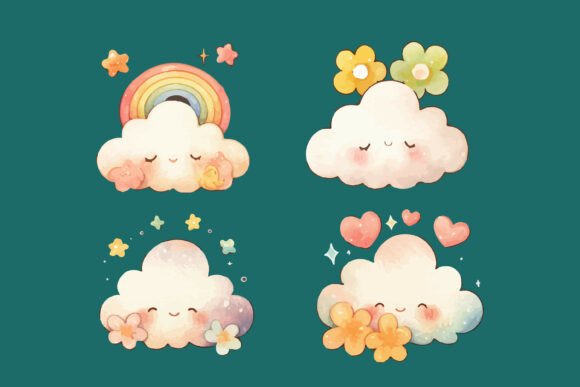
This specific collection attempts to bridge that gap. By digitizing hand-painted cloud forms into vector paths, the pack retains the visual language of watercolor—soft edges, color gradients, and subtle transparency—while embedding these qualities into a vector file structure (typically SVG, EPS, or AI formats). Each cloud in the set features a gentle, dreamy aesthetic characterized by pastel hues. These elements are not merely flat colors; they are constructed to mimic the layering and bleeding effects of water-based pigments, yet they remain fully editable objects within vector software.
Key Benefits for Design Workflows
Designers considering this collection should weigh several distinct advantages that directly impact efficiency and output quality.
- Scalability: The primary benefit of the vector format is the ability to resize elements from a small icon to a large billboard without any loss of fidelity. This is particularly crucial for projects that require multi-format delivery, such as branding kits that need to appear on both business cards and outdoor signage.
- Color Flexibility: While the default palette consists of soft pastels, the vector nature of the files allows for easy recoloring. Designers can adjust hue, saturation, and brightness to match specific brand guidelines or mood boards without needing to repaint the asset manually.
- Layered Editing: Unlike a flattened image, vector clouds often consist of separate layers or groups. This permits designers to isolate specific parts of a cloud, rearrange them, or combine them with other elements to create custom compositions.
- Consistency: Using a unified pack ensures that all cloud elements share a consistent artistic style. This coherence is vital for maintaining a professional look across storybook illustrations, educational materials, or website headers.
Ideal Use Cases and Applications
The Pastel Watercolor Cloud Vector Pack is particularly well-suited for projects that require a calm, playful, or whimsical atmosphere. Its aesthetic aligns naturally with themes involving childhood, nature, and tranquility.
Children's Media and Education
The soft edges and gentle color palette make these assets ideal for children's illustrations, nursery designs, and educational materials. In storybooks or flashcards, the dreamy look of the clouds can help establish a soothing narrative tone. Because the files are vectors, they can be printed at high resolutions for hardcover books or scaled down for mobile apps without blurring.
Branding and Packaging
Brands targeting families, wellness products, or eco-friendly markets often utilize soft, organic imagery. These cloud vectors can serve as background elements, logo accents, or packaging motifs. The ability to recolor the vectors ensures they can be adapted to fit various brand identity requirements while maintaining the "hand-made" feel that consumers often associate with authenticity.
Digital Layouts and Decorative Elements
For web designers and social media managers, these clouds offer versatile decorative options. They can be used as section dividers, overlay textures, or floating elements in posters and stickers. The lightweight nature of vector files also contributes to faster loading times on websites compared to heavy, high-resolution raster images.
Considerations and Tradeoffs
While the versatility of the Pastel Watercolor Cloud Vector Pack is significant, there are tradeoffs and limitations that users must consider to manage expectations effectively.
Complexity vs. Simplicity: Although the files are vectors, the attempt to simulate watercolor texture can result in complex path structures with many anchor points. If a designer needs to perform heavy manipulation or convert these into simple geometric shapes, the file size may be larger than expected, and editing individual points could be tedious compared to using basic vector primitives.
Aesthetic Limitations: The "pastel" and "dreamy" description indicates a specific stylistic constraint. These assets may not be suitable for projects requiring bold, high-contrast, or hyper-realistic imagery. Attempting to force these soft clouds into a gritty, industrial, or corporate tech context may result in a disjointed visual identity. The style is inherently soft; it does not easily transition into sharp, aggressive, or dark themes.
Texture Authenticity: While the vector format mimics watercolor, it is still a digital approximation. For projects demanding the absolute highest level of textural realism—such as fine art reproduction or high-end editorial photography—using actual scanned photographs of watercolor paintings might yield a more authentic result than even the best vector simulation.
When to Consider Alternatives
Before committing to this specific collection, designers should evaluate whether their project goals align with its capabilities. Alternatives may be worth considering in the following situations:
- Need for Photorealism: If the project requires clouds that look indistinguishable from reality, a library of high-resolution stock photography would be a superior choice over stylized vector art.
- Strict Geometric Requirements: If the design system relies on strict grid lines and perfect geometric symmetry, the organic, irregular shapes of watercolor clouds may clash with the overall layout. In such cases, minimalist line-art clouds or solid shape vectors might be more appropriate.
- Animation Needs: While vector files can be animated, complex watercolor-style vectors with many nodes can be computationally expensive to animate smoothly in real-time applications like games or interactive web experiences. Simpler vector shapes or pre-rendered video assets might perform better.
- Custom Texture Requirements: If a designer needs a specific type of paper grain or paint bleed that differs significantly from the provided set, creating a custom raster texture or commissioning a bespoke illustration might provide a better fit than modifying existing vectors.
Decision-Making Insights
Selecting the right asset pack ultimately depends on balancing aesthetic goals with technical constraints. The Pastel Watercolor Cloud Vector Pack offers a compelling solution for those who need the emotional resonance of hand-painted art combined with the practical flexibility of digital tools. It is a strong fit for illustrators, educators, and brand designers working within the realms of children's content, lifestyle branding, and soft-themed layouts.
However, if a project demands photorealism, extreme minimalism, or high-performance animation, this pack may introduce unnecessary complexity or stylistic dissonance. By carefully reviewing the specific requirements of the project—particularly regarding scale, color customization, and stylistic tone—designers can determine if this collection provides the necessary foundation for their creative work or if a different approach is warranted. Understanding these nuances ensures that the chosen assets enhance the final design rather than complicating the workflow.